 Last week I received an invitation to beta test the next update for moovit. Since then I have been trying out all the features and using their app to get to and from work everyday. I have to start by saying that this app has received a much needed make over. While not all the graphics are amazing they are a HUGE improvement over the current version on the app store.
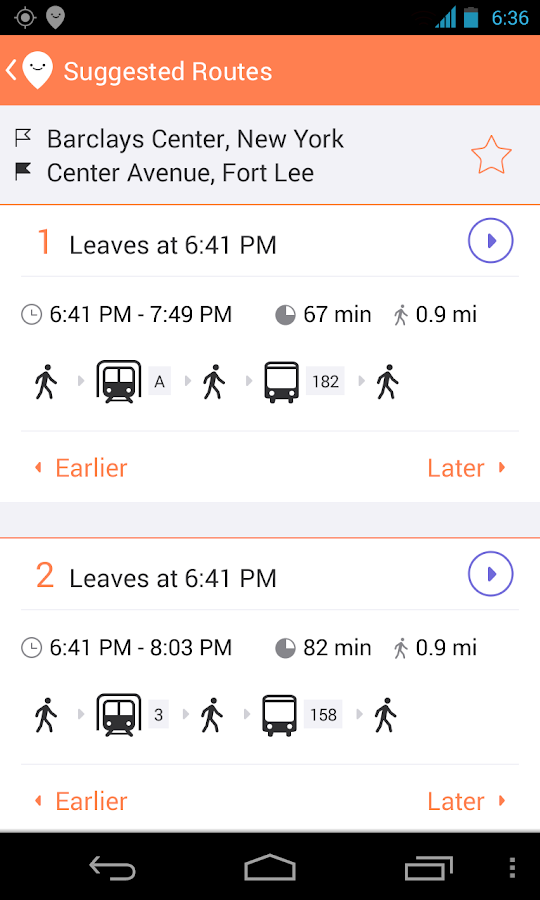
First I have to welcome moovit to the world of flat design, the logo and basically everything inside the app has been revamped to match the trends in UI design that we've been seeing in IOS7 and what we will be seeing in Android's Kitkat. The first thing that I noticed upon launching the app was that they finally cleaned up the screen to make everything easier to see and more aesthetically pleasing to use. The map has been cleaned up, I always felt that the orange flags for the bus stops were always too big, I'm not really sure that blue was the right color to go for but the size of them makes it much easier to tell which stop is on which side of the street.
I have to say that the new icon and "characters" are very cute and have a very modern feel. The old logo with the thick lines felt dated especially after the release of IOS7 and the movement of the rest of the design world to flat design. Even just the simple change of the layout of the boxes in the trip planning screens is a huge improvement.
The number one thing that made me hate the old moovit were the menus. They were bulky, ugly and some times hard to read. Now that the menus are built in the Google standard, sliding in from the side and solid they are easy to see, read and use. There is one icon that I felt was weird the moment I started up the app, it is the plan trip icon on the main screen. To me it looks like it was a mistake, I would suggest working on a better icon the other two are cute but that was one is very weird looking.
 One complaint that I have had in the past was that moovit would send me alerts about bus lines that were changed or when the Tel Aviv marathon was warning me that bus lines would be changed for the day, but they were never relevant to me. I feel like an app that I use everyday to take the same buses to and from
 work should know what routes I take and only alert me of changes in the routes that I take on a regular basis. I do like that in the new version you can choose the lines that you get alerts about, but I feel like it should be an intelligent system that learns my routine.
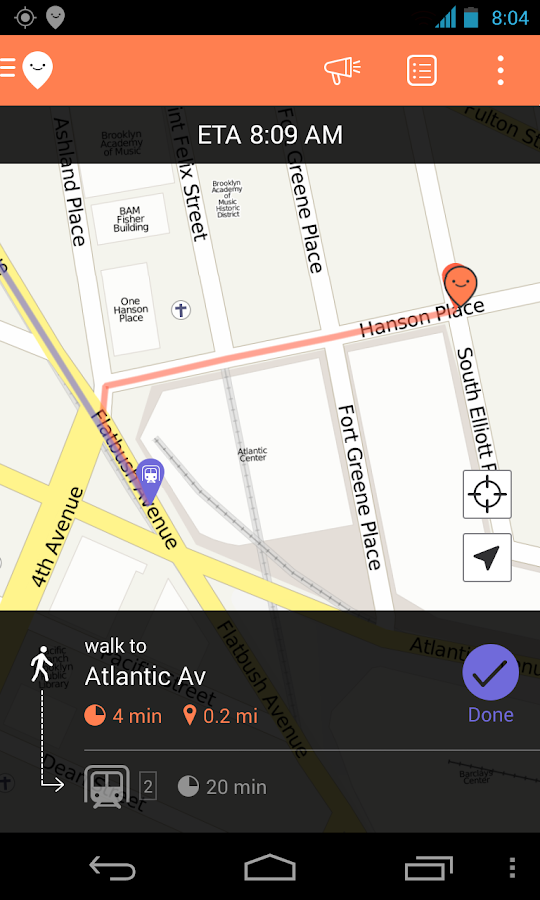
I have not had the chance to try out the navigation, but when I do I will update this post. Also does anyone know what the points are for? I have been using this app for two years and have yet to understand what they mean.
There is one feature that I feel is missing, under favorites I think that there should be the option to favorite a bus stop and not just a line. I find that I take buses from the same stop all the time, and have lines that are my favorites but they're not always the line that is going to be coming the soonest. The problem I then run into is that I can see when my favorite line is coming to the stop that I have marked, but there is no way to just from the stop on the favorite line to the list of buses that are coming that stop. This feature may be more complicated than I'm thinking it is, but for people like me who go to the same stops with multiple lines that do similar routes this would be very helpful.
I was invited to try out the new payment system that the creators of moovit are working on. I am very interested to see this project progress further, they could revolutionize how we use public transportation.
Have you been use Moovit or another public transportation app? We'd love to hear about them in the comments bellow!
 |
| old version |
I have to say that the new icon and "characters" are very cute and have a very modern feel. The old logo with the thick lines felt dated especially after the release of IOS7 and the movement of the rest of the design world to flat design. Even just the simple change of the layout of the boxes in the trip planning screens is a huge improvement.
The number one thing that made me hate the old moovit were the menus. They were bulky, ugly and some times hard to read. Now that the menus are built in the Google standard, sliding in from the side and solid they are easy to see, read and use. There is one icon that I felt was weird the moment I started up the app, it is the plan trip icon on the main screen. To me it looks like it was a mistake, I would suggest working on a better icon the other two are cute but that was one is very weird looking.
 One complaint that I have had in the past was that moovit would send me alerts about bus lines that were changed or when the Tel Aviv marathon was warning me that bus lines would be changed for the day, but they were never relevant to me. I feel like an app that I use everyday to take the same buses to and from
  work should know what routes I take and only alert me of changes in the routes that I take on a regular basis. I do like that in the new version you can choose the lines that you get alerts about, but I feel like it should be an intelligent system that learns my routine.
I have not had the chance to try out the navigation, but when I do I will update this post. Also does anyone know what the points are for? I have been using this app for two years and have yet to understand what they mean.
There is one feature that I feel is missing, under favorites I think that there should be the option to favorite a bus stop and not just a line. I find that I take buses from the same stop all the time, and have lines that are my favorites but they're not always the line that is going to be coming the soonest. The problem I then run into is that I can see when my favorite line is coming to the stop that I have marked, but there is no way to just from the stop on the favorite line to the list of buses that are coming that stop. This feature may be more complicated than I'm thinking it is, but for people like me who go to the same stops with multiple lines that do similar routes this would be very helpful.
I was invited to try out the new payment system that the creators of moovit are working on. I am very interested to see this project progress further, they could revolutionize how we use public transportation.
Have you been use Moovit or another public transportation app? We'd love to hear about them in the comments bellow!